
One PEMF device can have a very different Gauss peak at each setting.
Many PEMF product pages give one number in Gauss, the unit for magnetic field strength, while most devices have more than one setting. Each setting produces its own peak, so a single figure describes one setting and leaves the rest of the dial out. We'll show how far apart two settings can be on a paddle we measured, then end with the question to ask about any Gauss figure you're given.
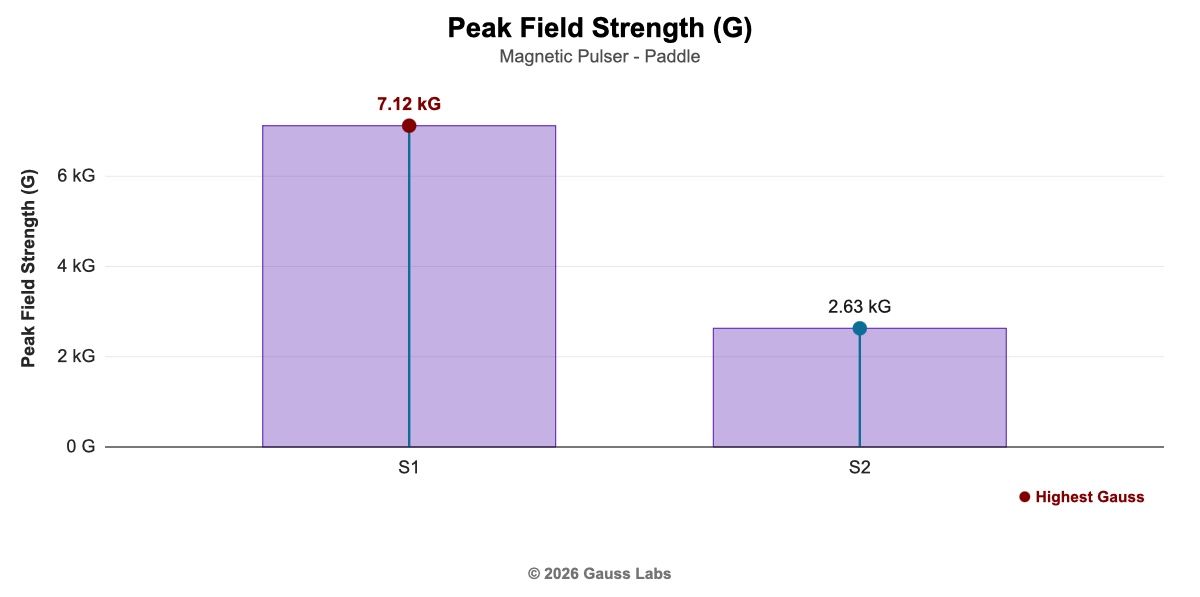
Our paddle peaks at 7,120 Gauss on one setting and 2,630 on the other.
We measured the Magnetic Pulser with Paddle at both of its settings (report M2606071704). Setting 1 peaks at 7,120 Gauss (712 millitesla) and setting 2 at 2,630 Gauss (263 millitesla), a little over a third of the first. Both readings are the peak field strength, the highest the field gets at the accessory surface, taken the same way on the same unit, so the setting is the only thing that changed between them.
An “up to” figure describes only the strongest setting.
A page that printed only “up to 7,120 Gauss” would describe setting 1 and leave you guessing about setting 2. If you'd mostly use the gentler setting, the figure on the page tells you nothing about it, and comparing two devices by their strongest settings says little if you'd run either one lower.
A setting can change more than the peak. On the Paddle, setting 1 pulses at 0.302 hertz (Hz), or pulses per second, and setting 2 at 1.09 Hz, so the weaker setting also pulses more than three times as often. That's why our reports give every measured value setting by setting rather than one figure for the whole device.
Ask which setting a Gauss figure comes from.
When a page or a salesperson gives you one number, ask which setting it belongs to and what the other settings measure. A maker who measured every setting can answer both, and the answer lets you compare the setting you'd actually use.
Want every setting of your device measured?
We measure each device with each accessory fitted, at every setting, and report the peak for each one. If you'd like to see what that looks like, our example reports are open to read.
Schedule a Call See Example ReportsWhen a page gives you one Gauss figure, ask which setting it's from.